
What Happens After You Press Enter?
You type `example.com` into a browser, press Enter, and a page appears. It feels like one action. Under the hood, it is closer to a relay race across half the modern internet.
The browser parses a URL. DNS turns a name into an address. The client opens a transport connection, negotiates encryption, sends HTTP, crosses your local network, passes through NAT, your ISP, transit providers, peering links, maybe a CDN edge, maybe an origin data center, and eventually receives enough HTML, CSS, JavaScript, images, fonts, and API responses to paint pixels on the screen.
That is the useful way to think about the web: not as “a browser talks to a server”, but as a chain of independent systems that mostly cooperate until one of them does not.
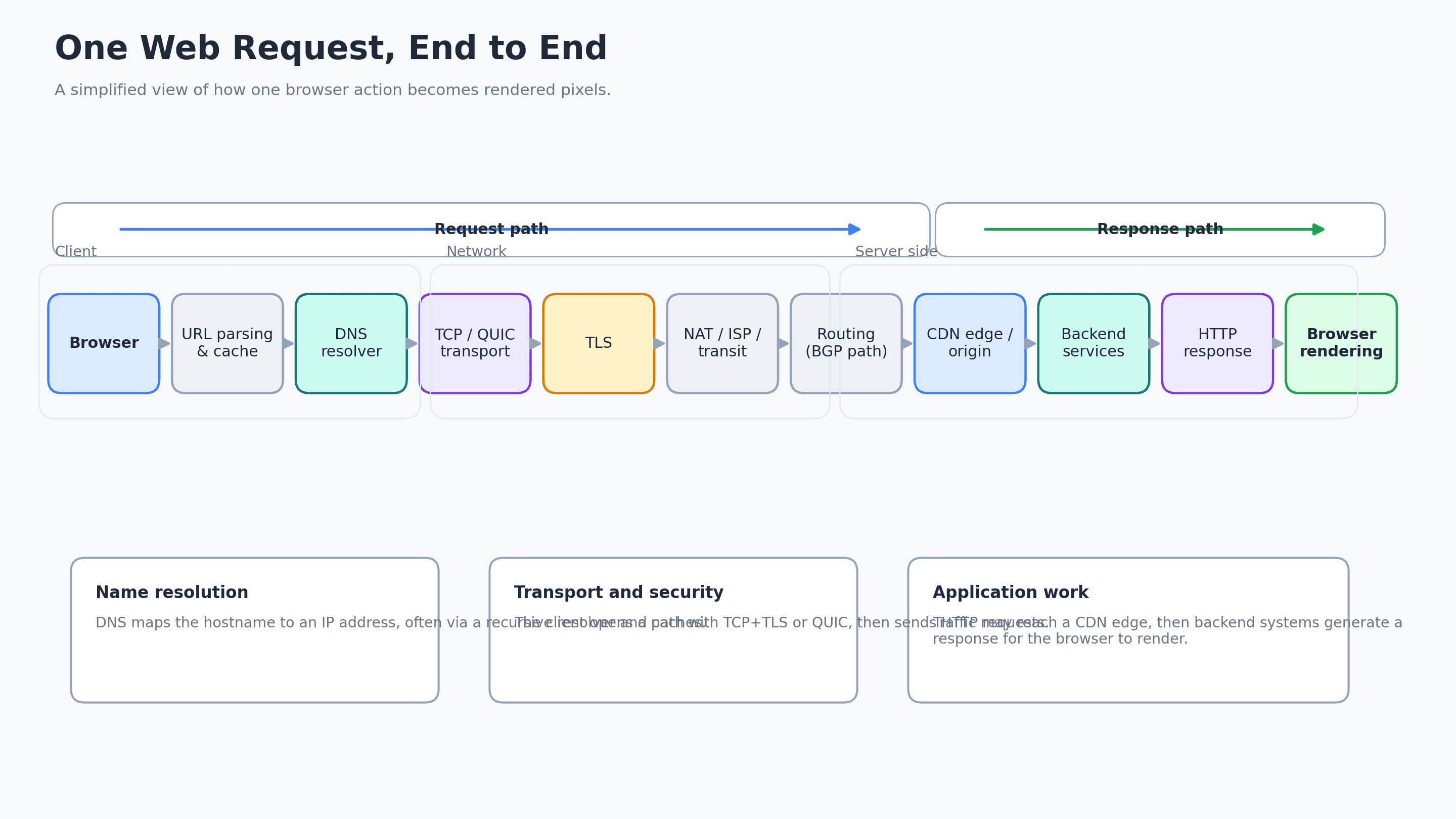
One click, many failure domains
For users, failures collapse into one sentence: “the site is down.”
For engineers, that sentence is almost useless. “Down” could mean:
The resolver returns `NXDOMAIN`. The authoritative DNS server is reachable from one region but not another. IPv6 is broken while IPv4 works. TCP SYN packets are retransmitted until the browser gives up. The certificate is valid on the origin but stale on a CDN edge. A route leak sends traffic to the wrong network. The origin returns `200 OK`, but the page stays blank because a JavaScript bundle blocks the main thread.
The web is fast because many layers are heavily optimized. Troubleshooting is hard because those same layers hide each other.
The goal of this article is to build a mental map. Not a trivia list of protocols, but a practical path you can follow when a request gets weird.
Step 1: the browser decides what you meant
Before the network does anything, the browser has to interpret your input.
When you type `example.com`, the browser decides whether this is a search query or a URL. It normalizes the address, chooses a scheme such as `https`, applies browser state such as HSTS rules, checks caches, and may consult service workers or existing connections.
The important concept here is **origin**. For the web security model, `https://example.com` is not just a string. It defines the scheme, host, and port that determine where requests go and which other resources the page is allowed to interact with.
At this point, the browser does not really want a website. It wants an IP address, a protocol, and a safe way to talk to the other side.
Step 2: DNS turns a name into a routeable destination
Humans like names. Networks route packets to addresses. DNS is the distributed system that connects the two.
A browser usually does not jump directly to the authoritative DNS server for a domain. It checks several places first: browser cache, operating system cache, local configuration such as a hosts file, and then a recursive resolver. That resolver may be operated by your ISP, your company, a public DNS provider, or a privacy-focused resolver over DoH or DoT.
If the recursive resolver does not already know the answer, it walks the DNS hierarchy:
It asks a root server where to find the `.com` servers. The root server does not know the IP address of `example.com`; it points to the top-level domain layer. The `.com` servers point to the authoritative name servers for `example.com`. The authoritative server finally returns records such as `A` for IPv4 or `AAAA` for IPv6.
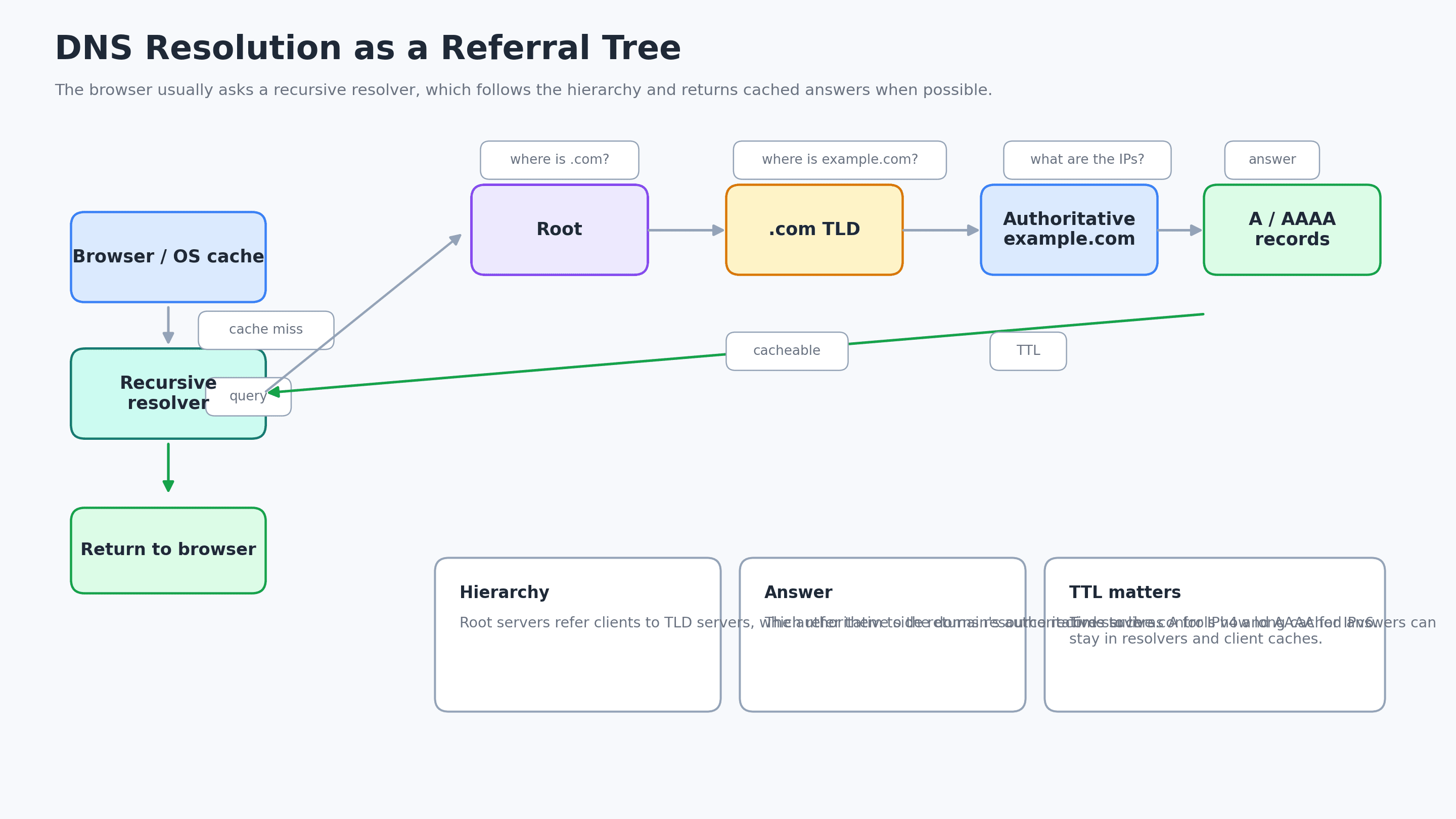
The detail that matters operationally is **TTL**, or time to live. DNS answers are cached. That makes the internet faster, but it also means changes do not become globally visible at the same instant. When a migration goes wrong, one user may hit the new address while another still hits the old one.
Common DNS symptoms include `NXDOMAIN`, `SERVFAIL`, slow lookup time, different answers from different resolvers, stale records, broken CNAME chains, split-horizon DNS surprises, and DNSSEC validation issues.
Good first tools are still boring and effective: `dig`, `nslookup`, resolver logs, browser network diagnostics, and comparing answers from multiple networks.
Step 3: the client chooses a transport path
Once the browser has an address, it needs a transport.
Traditional HTTPS uses TCP plus TLS. HTTP/1.1 and HTTP/2 commonly run this way. TCP gives applications a reliable byte stream over IP. It numbers data, acknowledges what arrived, retransmits what was lost, and presents the application with ordered bytes.
HTTP/3 is different. It runs HTTP semantics over QUIC, and QUIC runs over UDP. UDP itself does not provide reliability, ordering, or congestion control in the same way TCP does. QUIC builds modern transport behavior above UDP, with encryption integrated into the connection setup and support for multiplexed streams.
That does not mean TCP is “dead.” It means the web now has more than one mainstream transport pattern. For debugging, this matters because a connection can fail differently depending on whether the browser is using TCP/TLS or QUIC/UDP.
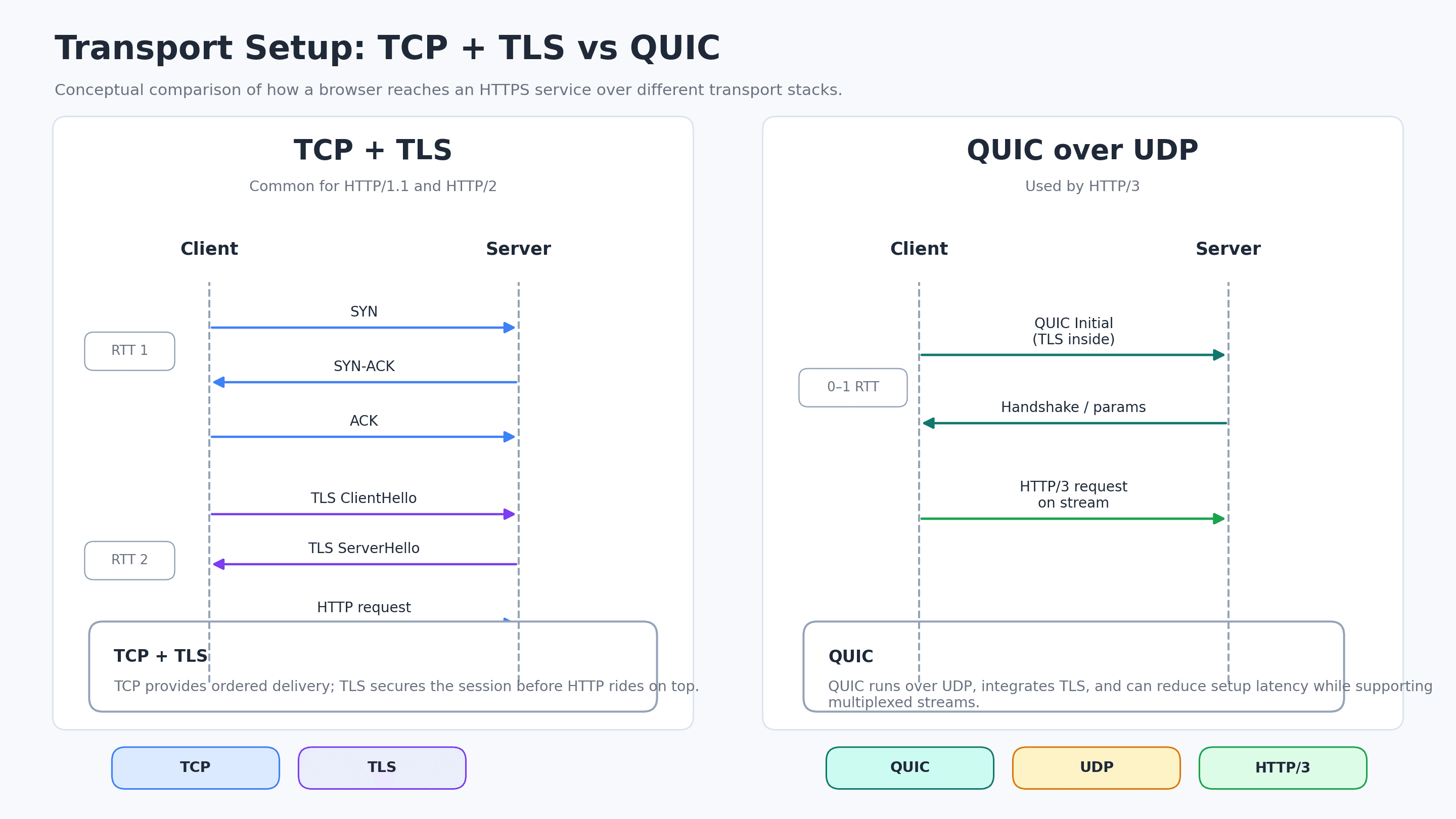
If you see intermittent failures only on one network, do not assume the application is broken. UDP may be blocked or shaped. IPv6 may be partially misconfigured. A middlebox may treat HTTP/3 differently. The same URL can exercise different paths and protocol behavior depending on browser, network, cache, and server support.
Step 4: TLS protects the conversation, but not all metadata
For HTTPS, the browser and server negotiate TLS before normal HTTP data flows. The browser validates the certificate chain, checks that the certificate matches the hostname, agrees on cryptographic parameters, and derives session keys.
TLS is the reason someone on the Wi-Fi cannot casually read or rewrite your login request. It protects the HTTP payload: paths, headers, cookies, response bodies, and form data after the handshake completes.
But TLS does not make the whole interaction invisible.
The IP addresses remain visible. Timing and packet sizes remain observable. DNS may be visible unless encrypted DNS is in use. Historically, SNI in the TLS ClientHello exposed the hostname the client wanted. Encrypted ClientHello is designed to reduce that leak, but deployment is uneven and depends on support across browsers, servers, DNS records, and infrastructure.
For security engineers, TLS errors are not one category. They have fingerprints:
A hostname mismatch points to the wrong certificate or the wrong edge. An expired certificate is obvious but still common. An incomplete chain breaks some clients and not others. ALPN negotiation issues can affect HTTP/2 or HTTP/3 behavior. SNI mismatches can appear when a multi-tenant endpoint receives the wrong hostname.
`openssl s_client`, browser security panels, CDN diagnostics, and certificate transparency logs are your friends here.
Step 5: packets leave your machine and meet the local network
Before packets cross the internet, they have to cross the room.
Your laptop or phone sends frames over Wi-Fi or Ethernet to a next hop, usually a home router, office gateway, or cloud virtual router. On IPv4 LANs, ARP maps the next-hop IP address to a MAC address. The application does not care about that, but the packet cannot leave without a layer-2 destination.
Many networks also use NAT or NAPT. Your laptop may have a private address like `192.168.x.x`, while many internal devices share one public address. The router rewrites source addresses and ports, keeps a translation table, and tries to map returning packets back to the correct internal connection.
This is one of those historical compromises that never left. IPv4 address scarcity made NAT common. NAT made home and office networks practical at scale. NAT also made some protocols, peer-to-peer flows, and observability more complicated.
When local-network problems happen, they often look like random internet problems. Packet loss on Wi-Fi, overloaded NAT tables, broken MTU discovery, bad captive portals, and enterprise proxies can all produce symptoms that developers initially blame on the backend.
Step 6: BGP moves traffic between networks, not “the shortest path”
The internet is a network of networks. Your ISP, a cloud provider, a university, a CDN, and a telecom carrier can each operate an Autonomous System. BGP is how those systems exchange reachability information.
BGP does not ask, “What path has the lowest latency for this user?” It asks, roughly, “Which route is acceptable according to policy and path attributes?”
That distinction matters. Network operators make business and engineering decisions: peering, transit, local preference, prefix filters, traffic engineering, and route propagation. Sometimes a route is technically valid but operationally terrible. Sometimes an accidental or unauthorized route announcement leaks beyond where it should and attracts traffic that should have gone elsewhere.
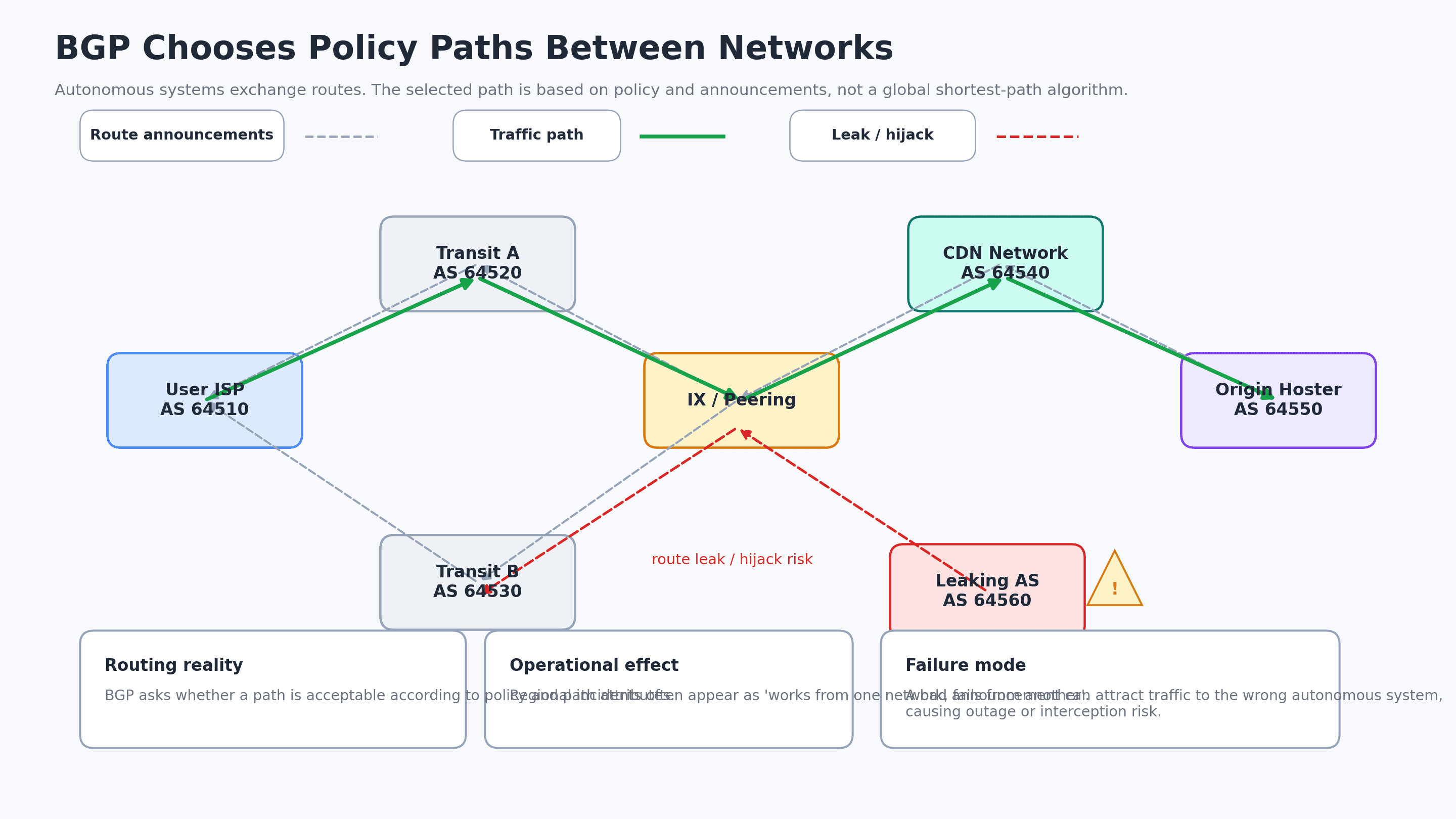
The famous 2008 YouTube/Pakistan Telecom incident is a useful reminder: interdomain routing is partly technical protocol, partly operational trust. Modern mitigations such as route filtering, IRR data, RPKI/ROA, and monitoring help, but they do not turn the internet into one centrally controlled router.
For debugging, BGP and routing problems often appear as regional weirdness. “Works from Berlin, fails from Singapore.” “Only users on one ISP are affected.” “The origin is fine, but traffic from one ASN takes a bizarre path.”
Tools like `mtr`, `traceroute`, RIPE Atlas, CDN analytics, route monitors, and provider looking glasses help separate application failures from reachability failures.
Step 7: the request often lands on a CDN, not your origin
For a large site, “the server” is often not the origin application server. The request may terminate at a CDN edge close to the user.
The CDN can do far more than cache images. It may terminate TLS, negotiate HTTP/2 or HTTP/3, apply WAF rules, run bot detection, compress responses, optimize images, serve stale content during origin outages, route traffic between origins, or run edge compute.
If the requested object is cacheable and present at the edge, the CDN can return it quickly. If not, the edge asks an upstream cache or origin. That one extra sentence hides a lot of production incidents.
Cache keys can be wrong. `Vary` headers can explode cache cardinality. Personalized content can accidentally be cached. An origin can be healthy but overloaded by a cache purge. A regional edge can have stale certificates or inconsistent configuration. Bot mitigation can block real users because a signal changed upstream.
A good CDN debugging habit is to ask: where did TLS terminate, which edge handled the request, was it a cache hit, and what did the edge send to origin?
Step 8: the backend is another chain of systems
If the request reaches your infrastructure, the journey is still not over.
A typical request may pass through a load balancer, reverse proxy, ingress controller, service mesh sidecar, WAF, application server, cache, database, message broker, feature flag service, and observability pipeline. TLS may terminate at the CDN, at a cloud load balancer, at an ingress controller, or inside the app.
This is why backend logs can be misleading by absence. If the application did not log the request, the request may have died before the application ever saw it. It could have been rejected by the CDN, dropped by a load balancer health check policy, blocked by a WAF rule, or routed to a different deployment.
For security teams, this layer is where transport identity becomes application identity. The TCP connection came from an edge or proxy, not necessarily the user. The real client IP may live in `X-Forwarded-For`, `Forwarded`, or provider-specific headers. If those headers are trusted incorrectly, attackers may spoof client identity or bypass rate limits.
A request path is also a trust path.
Step 9: HTTP returns more than a document
Eventually, the browser receives an HTTP response. Maybe it is HTML. Maybe it is a redirect. Maybe it is a `403`, `429`, `500`, or an opaque CORS failure that makes frontend developers stare into the middle distance.
HTTP is not just body bytes. Headers control caching, compression, security policy, cookies, content type, redirects, CORS, HSTS, CSP, and much more. A correct response body with wrong headers can still break the page or weaken security.
A few examples:
A missing `Content-Type` can trigger incorrect parsing. A too-broad CORS policy can expose APIs to unwanted origins. A broken `Cache-Control` policy can leak private data or overload origin. A redirect loop can look like a network failure. A missing `Secure` flag on cookies can undermine HTTPS expectations.
When debugging, `curl -v`, browser DevTools, HAR files, reverse-proxy logs, and CDN request IDs are often more useful than reading application code first.
Step 10: the browser still has to render the page
Network success is not user success.
The browser parses HTML into the DOM, parses CSS into the CSSOM, combines them into a render tree, computes layout, paints pixels, and runs JavaScript along the way. The page may have dozens or hundreds of subrequests: CSS, JS, fonts, images, API calls, analytics, ads, maps, feature flags, and third-party widgets.
A server can return the first HTML in 100 ms and still deliver a terrible user experience if the main thread is blocked for four seconds.
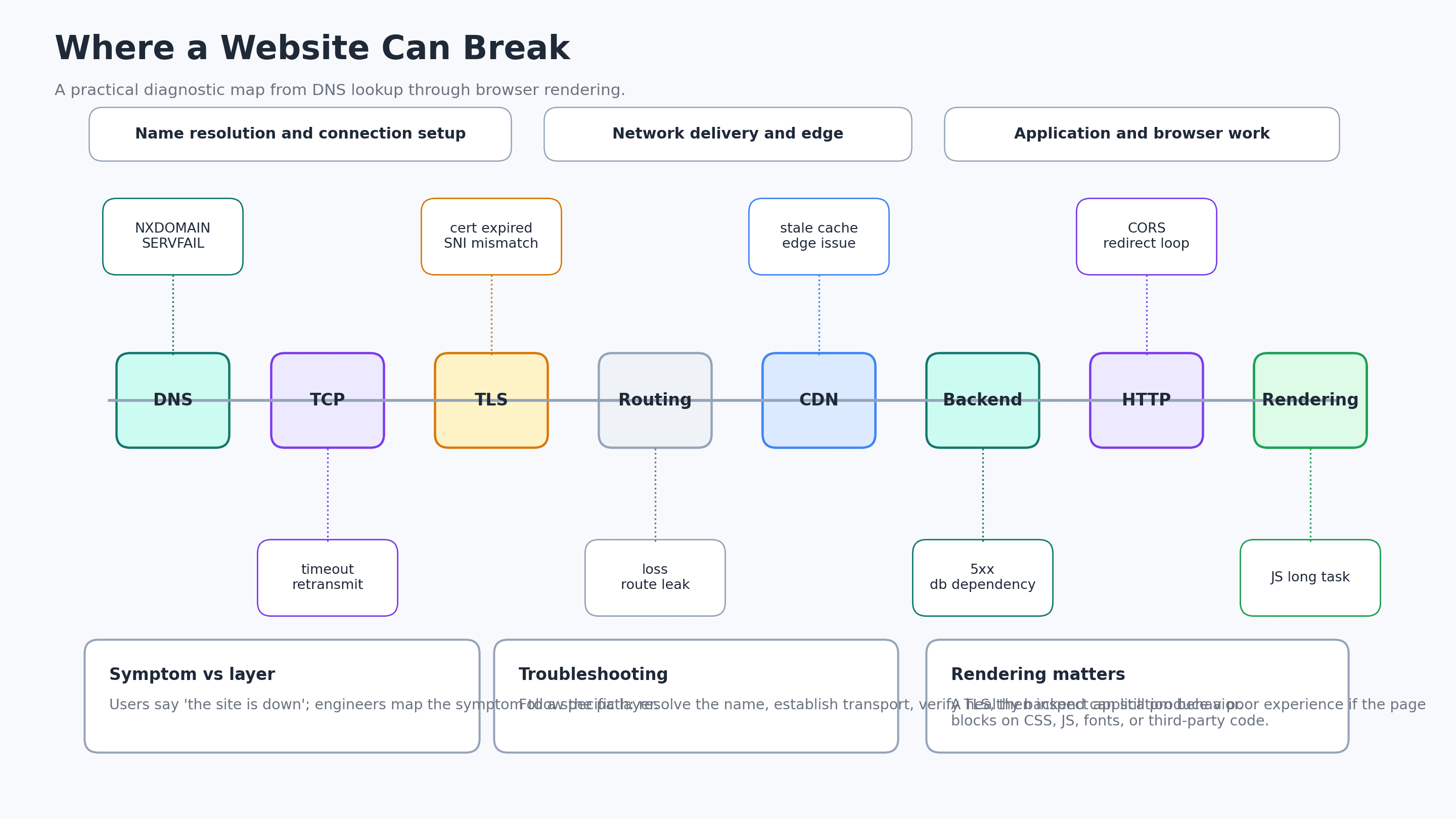
Rendering problems show up differently from network problems. DevTools may show fast requests, but the page remains blank. Long tasks, render-blocking CSS, huge JavaScript bundles, slow hydration, font loading, and third-party scripts can all delay visible pixels.
This is where frontend performance and infrastructure meet. A CDN can make assets arrive quickly, but it cannot make a massive script cheap to parse and execute on a low-end phone.
Web and internet are not the same thing
This distinction is simple and important.
The internet is the network substrate: addressing, routing, transport, autonomous systems, cables, radio links, routers, and operational agreements.
The Web is an application system built on top: URLs, HTTP, HTML, CSS, JavaScript, browsers, origins, cookies, and web security rules.
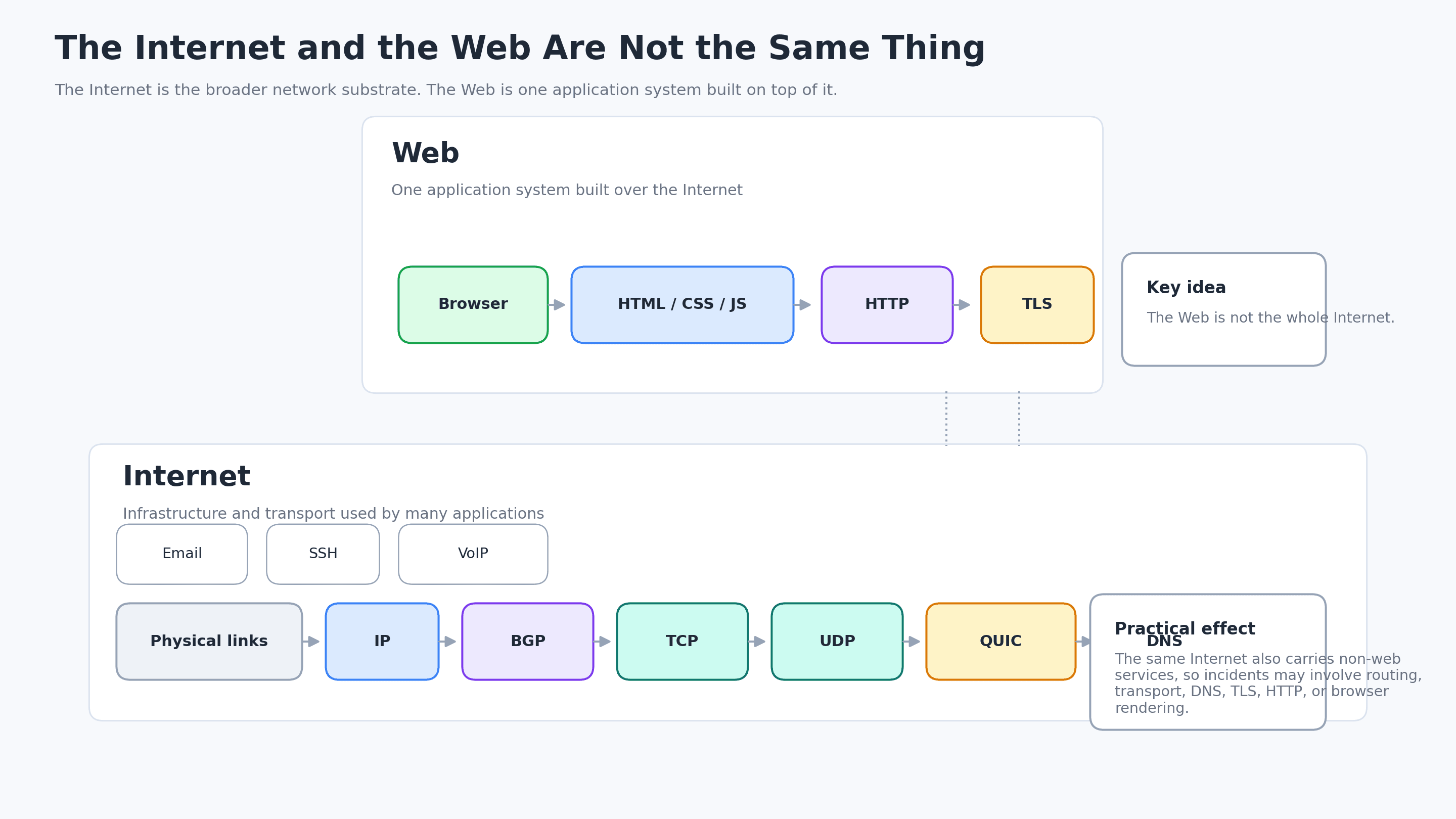
This is why the same internet can carry web browsing, email, SSH, video calls, VPNs, game traffic, and telemetry. It is also why “the website is broken” may involve DNS, routing, TLS, HTTP, application code, or rendering.
Historical compromises still shape modern incidents
The internet was not designed in one meeting and then cleanly implemented. It grew through working systems.
Packet switching made data networks practical. Hosts files worked until they did not, then DNS distributed the naming problem. TCP/IP became the practical foundation of internetworking. IPv4 address limits helped make NAT a daily reality. BGP scaled interdomain routing through policy and trust. TLS retrofitted confidentiality and authenticity onto a world that originally moved much more in the clear. CDNs emerged because distance, latency, and origin capacity matter.
Those historical layers are still visible in today’s incidents.
A DNS TTL mistake can turn a migration into a slow-motion outage. NAT can hide user identity or break protocols. BGP can make one region disappear. TLS configuration drift can split users by edge location. CDN cache behavior can decide whether an origin outage becomes visible. A frontend bundle can waste the performance win gained by every network optimization before it.
There is no single “internet layer” where reliability lives. Reliability is the sum of many imperfect layers behaving well enough at the same time.
A practical troubleshooting map
When a site misbehaves, walk the path in order.
Start with DNS. Does the name resolve? Do different resolvers agree? Are A and AAAA records expected? Is the TTL what you think it is?
Then check reachability. Does TCP connect? Does QUIC work or only TCP? Is packet loss visible? Does the problem correlate with one ISP, ASN, country, or protocol version?
Then check TLS. Is the certificate valid for the hostname? Is the chain complete? Does SNI route to the correct tenant? Did the CDN and origin receive the same certificate update?
Then check HTTP. Are status codes, redirects, headers, cookies, CORS, and cache behavior correct?
Then check the CDN and edge. Was the response a cache hit? Which edge served it? Did WAF or bot rules trigger? Did the request reach origin?
Then check backend logs and tracing. Which service handled the request? Which dependency was slow? Was the client IP interpreted correctly through proxy headers?
Finally, check rendering. Did the browser receive bytes but fail to show pixels quickly? Are JavaScript, CSS, fonts, and third-party scripts blocking the user experience?
The point is not to memorize commands. The point is to know which layer you are questioning.
Practical takeaway
Pressing Enter in a browser is a small action that crosses a large system.
DNS answers the naming question. TCP or QUIC creates a transport path. TLS protects the conversation. IP and BGP move packets across networks. NAT and local gateways rewrite and forward traffic. CDNs bring content and policy closer to users. Backend systems generate responses. Browsers turn those responses into pixels.
For developers and security engineers, this map is not trivia. It is how you avoid debugging the wrong thing for six hours.
When you understand the request path, `site is down` becomes a set of testable hypotheses. DNS? Transport? TLS? Routing? CDN? Backend? HTTP? Rendering?
That is the difference between staring at symptoms and actually following the packet.
Further reading
- RFC 1034 — Domain Names: Concepts and Facilities
- RFC 9293 — Transmission Control Protocol
- RFC 8446 — TLS 1.3
- RFC 9000 — QUIC
- RFC 9114 — HTTP/3
- RFC 4271 — BGP-4
- MDN — How the Web Works
- MDN — Critical Rendering Path
- RIPE NCC — YouTube Hijacking: A RIS Case Study