
When We Say "Linux", What Do We Actually Mean?
When people say Linux, they usually mean Ubuntu, Debian, CentOS, or some other operating system built around it. Strictly speaking, that is not quite right. Linux is the kernel: the part that manages hardware, memory, processes, and the rules of interaction between software and the machine.
Everything we usually touch, from shells and package managers to web servers and desktop environments, sits on top of that kernel. Once you separate those layers in your head, Linux stops feeling like a bag of commands and starts looking like a clear engineering stack.
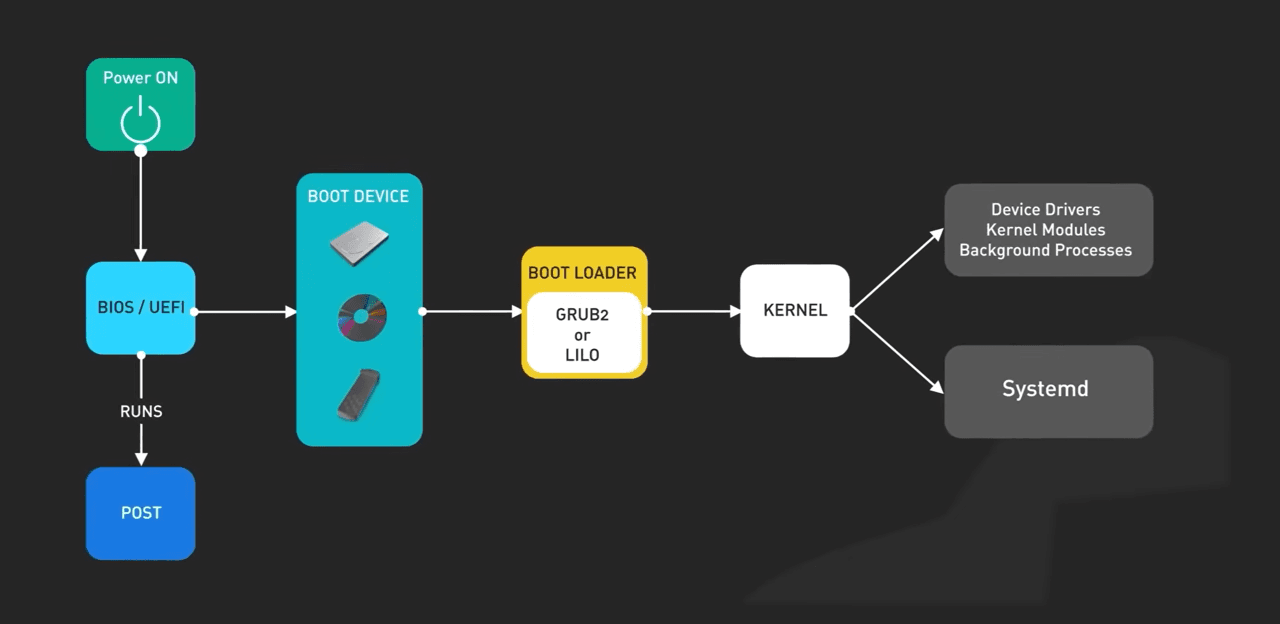
Start at the bottom: power, firmware, bootloader
Let’s start from the very bottom, namely from the hardware. We press the power button on the server. Current starts flowing. The processor wakes up, but at this moment it is still a dumb piece of silicon. It does not know what Linux is. It does not know what files are. It does not even know how much RAM it has. It simply looks for the first instruction at a hardcoded address.
The first thing that starts is the motherboard firmware, BIOS or UEFI. Its task is to bring the hardware to its senses. It runs POST `Power-On Self-Test`, checks whether there is memory, whether the video card works, whether the processor has initialized, whether it has found RAM, and so on. Then it starts polling devices and looks for something it can boot from. Let’s say it found a hard drive, but BIOS itself does not know how to read file systems. It does not know what `XT4` or `XFS` is. It cannot simply take and open a file, so it reads the very first 512 bytes of the disk. This is the MBR, or it looks into a special EFI partition. And that is where the bootloader lives.
GRUB loads the kernel, but initramfs solves the real problem
In the Linux world, this is almost always `GRUB2`. GRUB is a small but smart program. Its one special ability is that it can read the file system. It looks into the `boot` partition. There are two critically important files there, without which no magic will happen. The first file is `VMLINUZ`. In essence, this is that very Linux. This is the kernel itself, compressed into a binary file. The letter `Z` at the end means zip, that is, compressed. GRUB takes this file, unpacks it straight into RAM, and passes control to it. That’s it. From this moment, BIOS goes off to smoke on the sidelines, the bootloader dies. Now there is only one boss in the system — the kernel. And here the kernel runs into the main engineering problem, the chicken-and-egg problem. The kernel has loaded into memory. Its task is to mount our main disk in order to start the system.
But to mount the disk, it needs the file system drivers and the disk controller drivers. And where are the drivers located? Correct, on that very same disk that we still cannot read because we do not have the drivers. A closed loop. That is exactly why GRUB loaded the second file, `Initramfs`.
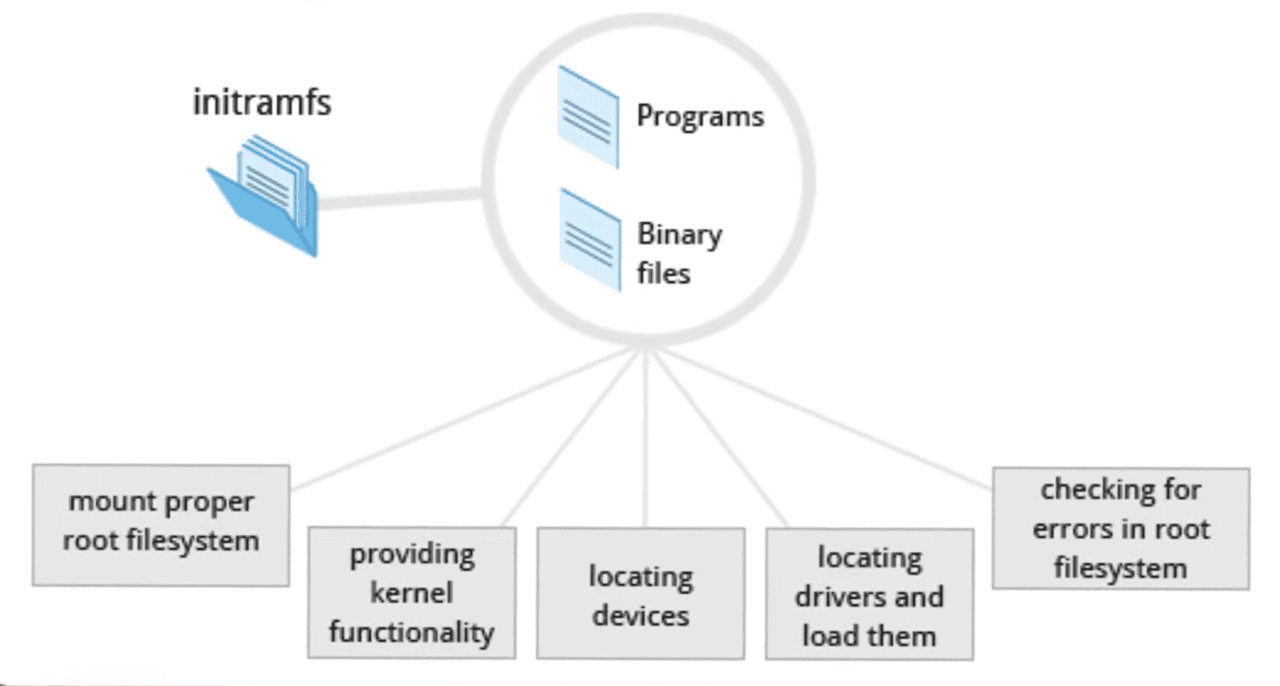
This is a small temporary archive that is expanded in RAM as a virtual disk. Inside it there is a mini version of Linux with a minimal set of drivers. So what happens? The kernel mounts `Initramfs` as a temporary root. From there it loads the drivers for our real hardware. RAID controllers, NVMe, LVM, and so on. Then it finds the real big disk and performs a trick called `pivot_root`, that is, changing the root. The kernel throws the temporary disk out of memory and replaces it with the real one. If the server freezes during boot with the error `KERNEL PANIC`, this means that the kernel got stuck exactly at this moment. It either did not find Initramfs, or inside it there was no necessary driver for the disk.
Kernel space is the privileged center of the system
So, the bootloader has done its job, the drivers have been loaded, and we enter `kernel space`. From the point of view of processor architecture, we are in protection ring `RING 0`. Everything is allowed here: any processor instruction or any memory address. Linux is a monolithic kernel, not a set of separate scattered services. The video card driver, the TCP/IP network stack, the ext4 file system driver. All of this is boiling in one giant pot, in one shared address space.
And this gives wild performance, because there is no overhead for communication between components. But it also increases risks. If a crooked video card driver crashes, it will drag the entire server with it into `KERNEL PANIC`.
### And the kernel itself has three main tasks. The first is memory management. And actually, here the main task of the kernel is to lie. It lies to our programs. When some Nginx or Python asks for memory, it thinks it is the only one in the system. For it, everything looks like a beautiful continuous tape of addresses. Although in reality physical memory is fragmented, and pieces of data are scattered chaotically. The kernel uses the mechanism of virtual memory. It maintains a giant table where it says: *“Virtual address X for process N is actually located in physical cell Y.”* And this gives two things. First, isolation. One process physically cannot climb into the memory of another. And second, swapping. That is, the kernel can quietly unload part of the data to disk if RAM runs out. But if memory runs out completely and swap is also full, then the `OOM Killer` comes. And it is not named that for no reason. It is literally a killer hired by the kernel. It wakes up, scans the process table, finds the one that eats the most while having low priority, and puts a bullet in its forehead. For example, in the same Kubernetes, this happens all the time. If we configure limits incorrectly in pods, then the `OOM Killer` will come and silently kill our application.
The second task is to divide time between processes. And for this there is the so-called processor scheduler. Let’s say we have four cores on the server, and 500 processes are running. How do they work simultaneously? They don’t. It is an illusion. The kernel uses preemptive multitasking. It lets a process work for several milliseconds, the so-called time quantum, and then forcibly stops it, and a `context switch` happens.
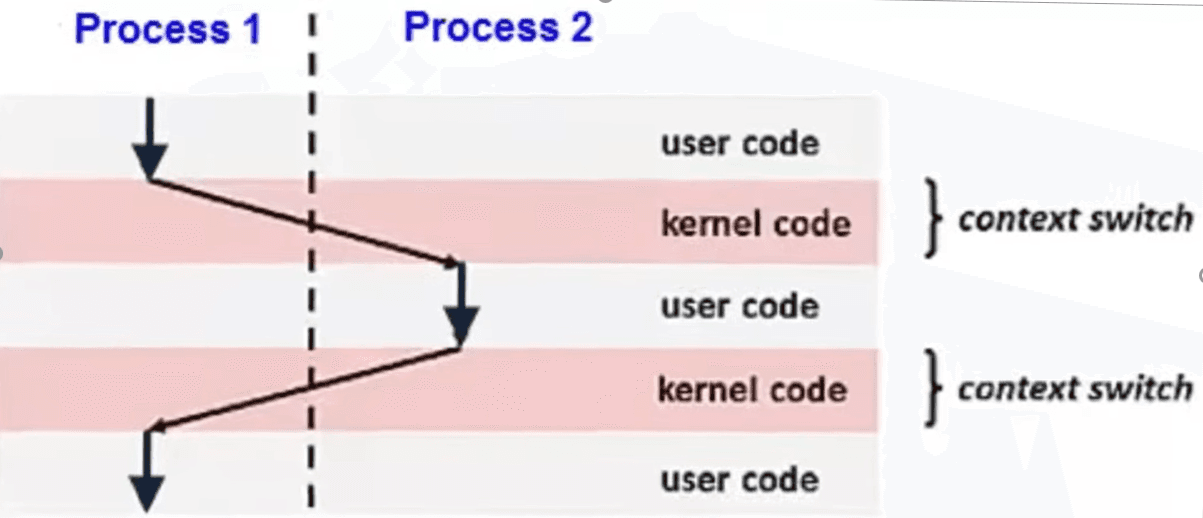
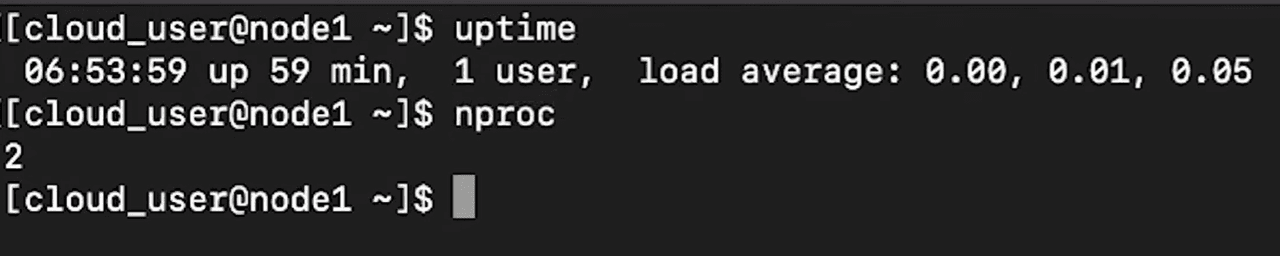
That is, the kernel saves the state of the processor registers for the current task, loads the state for the next task, and presses `Play`. And this happens thousands of times per second. If we see a high load average in monitoring, but the CPU is not loaded at 100%, it is possible that the system is spending all its time not on work, but on endless context switching between thousands of processes.
And the third task of the kernel is `hardware abstraction`. To put it simply, the kernel acts as a translator. Programs that run in userspace, that is, our user programs, do not know the hardware. Let’s say we have a Python program that writes one word to a file, but Python does not know where it is writing. To USB, to some old hard drive, or to a network share at all. Every disk has its own protocol, its own voltages, its own controller commands, and the kernel provides a universal interface. The program literally says: *“Write to this file.”* And the kernel driver translates this into electrical signals. And thanks to this, our code works the same way on any hardware.
System call and why we need it
We move higher. We have a kernel that manages everything. And we have our programs that want to do something: read a file, send a packet, or print text to the screen. But there is a problem. Between user mode, where our programs live, and kernel mode, there is a concrete wall. The processor physically forbids userspace code from accessing hardware. And if our program tries to access the disk directly, the processor will immediately kill it with a `Segmentation Fault` error. So what do we do? In reality, there is one single armored door in this wall. It is called a `system call`.
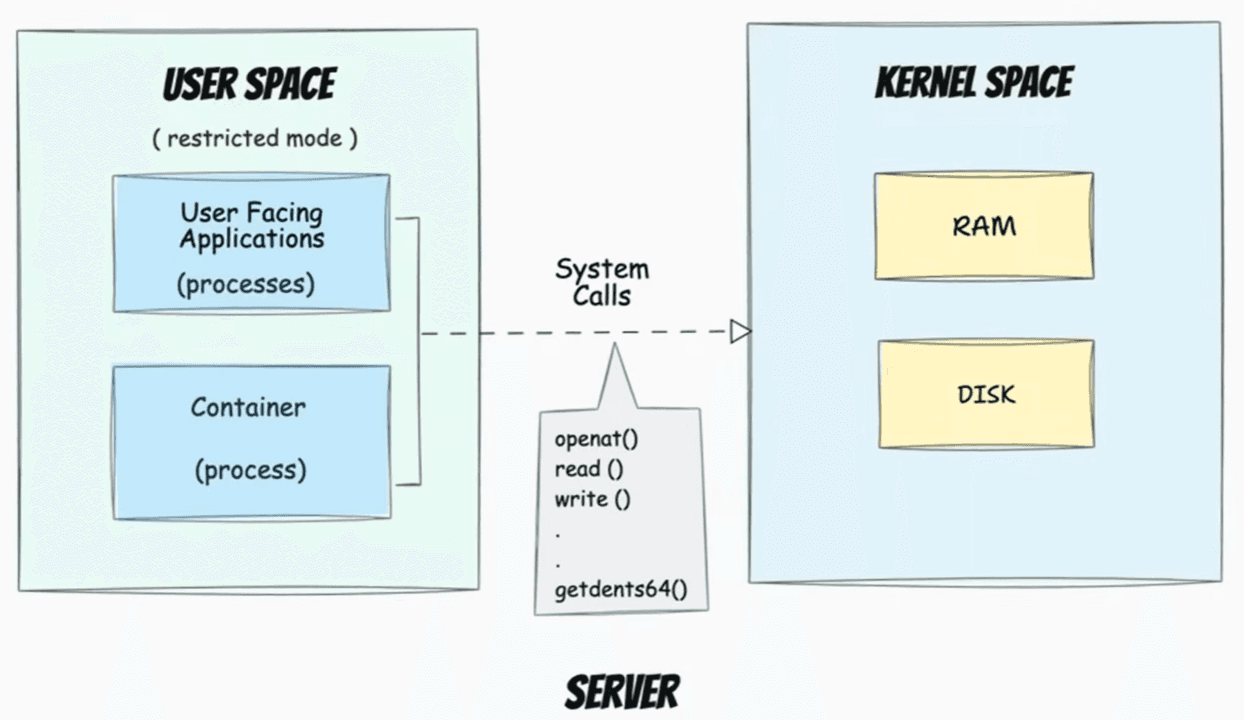
This is a strictly regulated API. The kernel says that it will not let us near the disk, but if we politely ask through a special function, it will do it for us. And let’s look at this using the same Python as an example. We write *"print Hello World"*, but a whole chain of events happens. The Python interpreter calls the standard GLIBC library. The library forms the system call `write()`. It places the arguments into the processor registers and generates a special software interrupt. The processor stops the program, switches the mode to ring zero, that very god mode we talked about at the beginning, and passes control to the kernel. The kernel checks whether this user has rights to write to this file. And if everything is okay, the kernel draws pixels on the screen or writes bytes to the disk, and then returns control to the program.
And in reality there are a huge number of system calls, around 300–400 of them. But there are basic syscalls that you need to know, the ones the whole foundation stands on: these are `fork()` and `exec()`, `open()` and `close()`, `read()` and `write()`, `socket()` and `connect()`. But why know this? Because programs often lie. Logs can be empty, and errors can be uninformative. But a program cannot lie to the kernel. It must make **syscalls** in order to do anything at all. And this is where the main debugging tool enters the stage: `strace`.
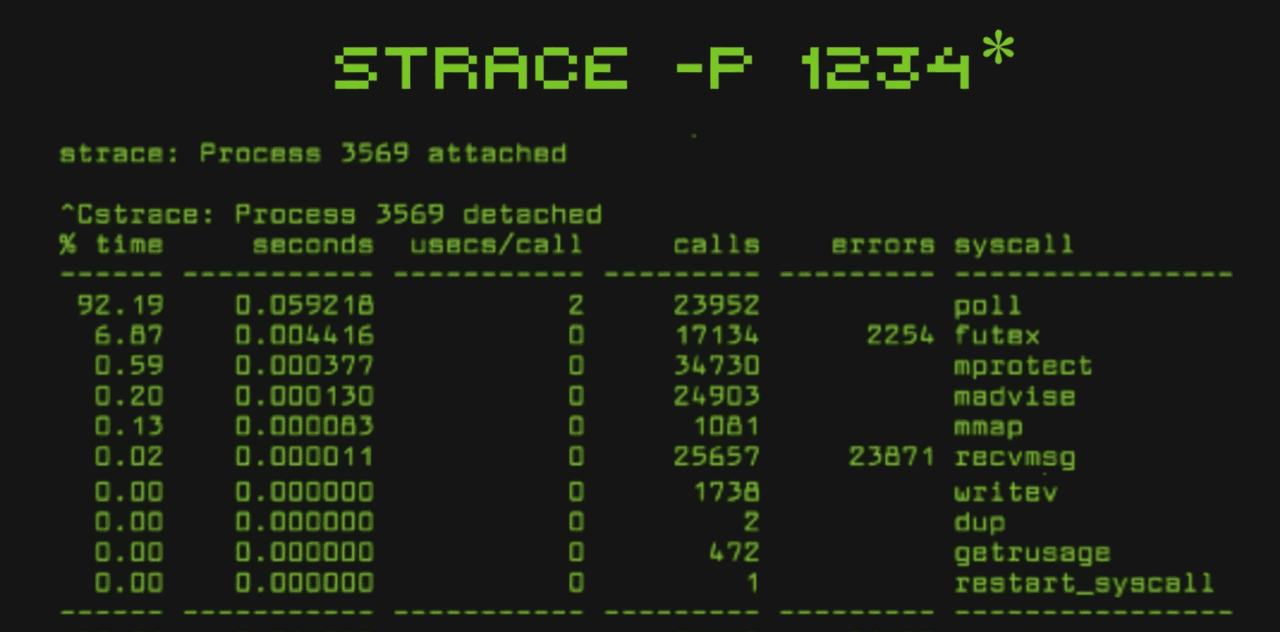
It is wiretapping for syscalls. We run strace on some process and see the whole inside story: what it tried to do, what it received, or where it got stuck. `Strace` - is an X-ray. It shows us what the program is really trying to say to the kernel. And if you can read strace output, then for you there are no unclear bugs.
Small, but important **SYSTEMD**
We continue moving up the stack. The kernel has loaded, initialized memory and drivers, but the server is still empty. There is no SSH, no console, no network. For the system to come alive, the kernel must start the very first process in `user space`. And for this, it looks on the disk for an executable file at the address **/sbin/init** and starts it. This process receives *PID 1*, its unique ID. All other processes in the system, *PID 2, 3, 4000, 10000*, will be descendants of this process. If the first process dies or exits, the kernel decides that the system is broken and falls into `KERNEL PANIC`, and the server stops. And in modern Linux, the role of the first process is performed by **SYSTEMD**.
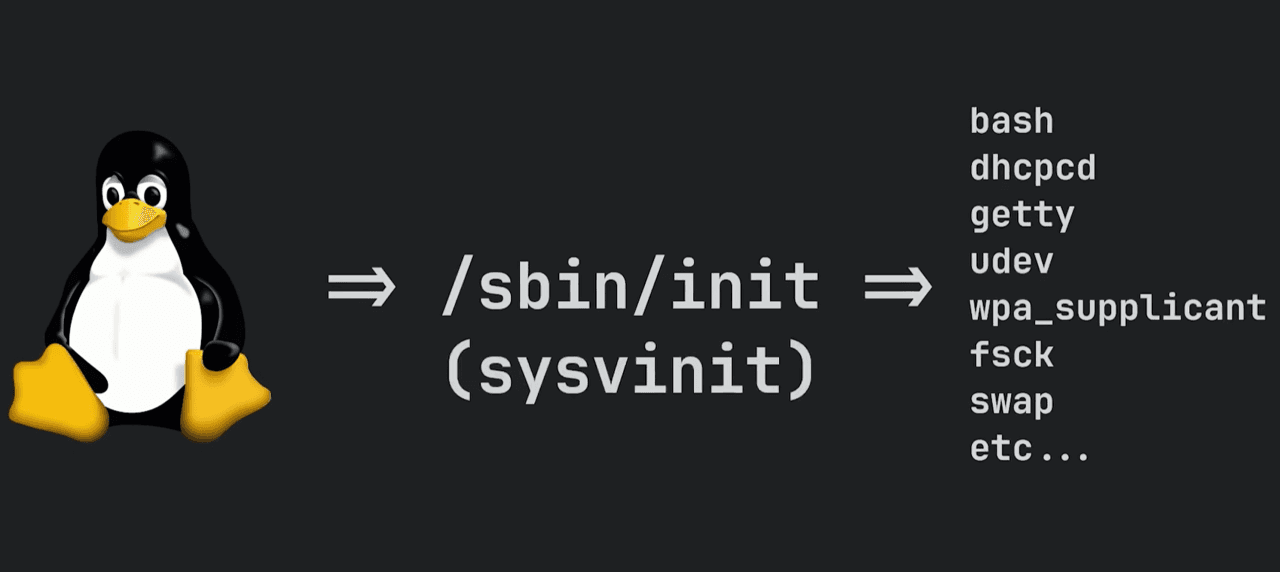
And why systemd specifically? Earlier, in the days of `SysVinit`, processes were started stupidly one after another. First the network, then the disk, then the database. It was slow. **SYSTEMD** works like a dependency manager. It builds a directed graph, by the way, like in Terraform. Roughly speaking, it sees it like this: NGINX depends on the network, Postgres depends on the disk, and SSH depends on nothing, and it starts all of this in parallel, utilizing the processor as much as possible during boot.
And what does systemd physically do during startup? First, it mounts real disks into the directory tree. Second, it determines the boot target, and third, it starts bringing up units: it starts sshd so we can connect, it starts the Docker daemon so containers can come up, and so on. At the same time, we as admins cannot simply tell a process: *“Start”*. We communicate with *PID 1* through the **SystemCTL** utility. When we write **SystemCTL** start NGINX, in essence, we send a command to systemd through a specific socket. Systemd checks whether we have rights, looks at the dependencies of NGINX, and performs the system call fork(), that is, creates a copy of itself, and `exec()`, that is, replaces the copy with the NGINX binary. This is how the web server process is born. It is a child of **SYSTEMD**.
Everything is a file
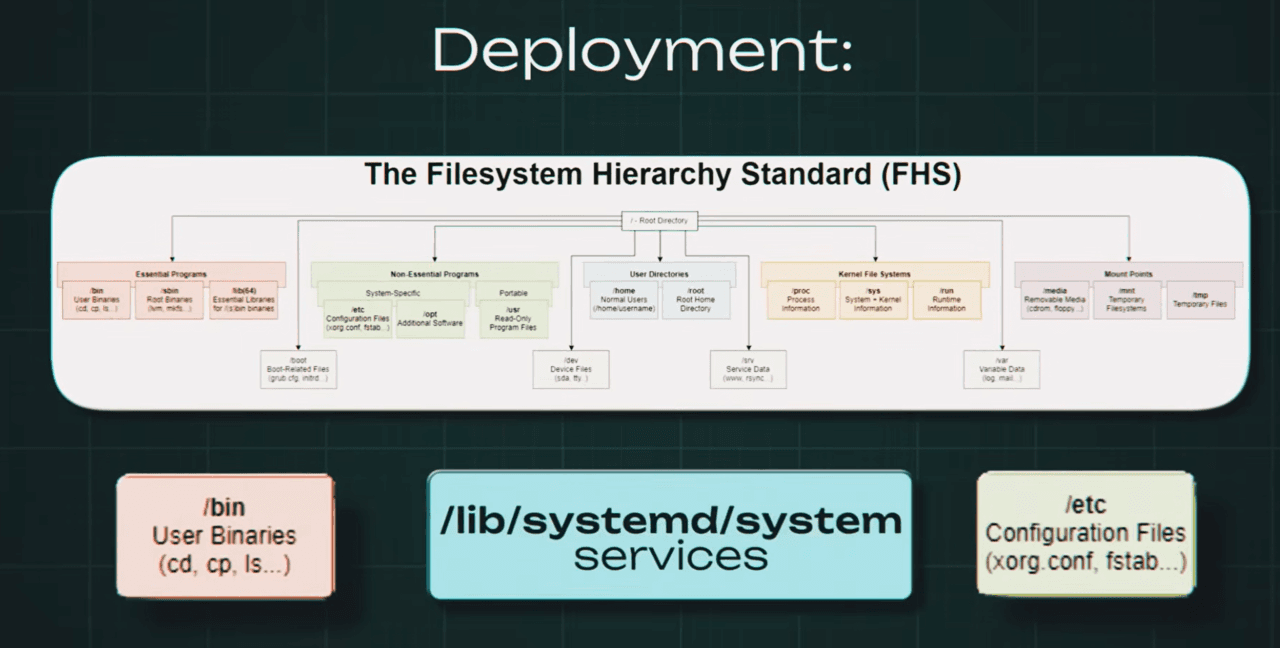
So, the processes are running, but processes in a vacuum are useless. They need to read configs, write logs, save images. We rise to the next level of abstraction: the file system. And here the main Unix philosophy rules. Everything is a file. But let’s break this down not as a slogan, but as an engineering solution. In Windows, everyone is used to drive letters: *C, D, E, F,* and so on. This is physical separation of devices. In Linux, the approach is different. There is a single directory tree.
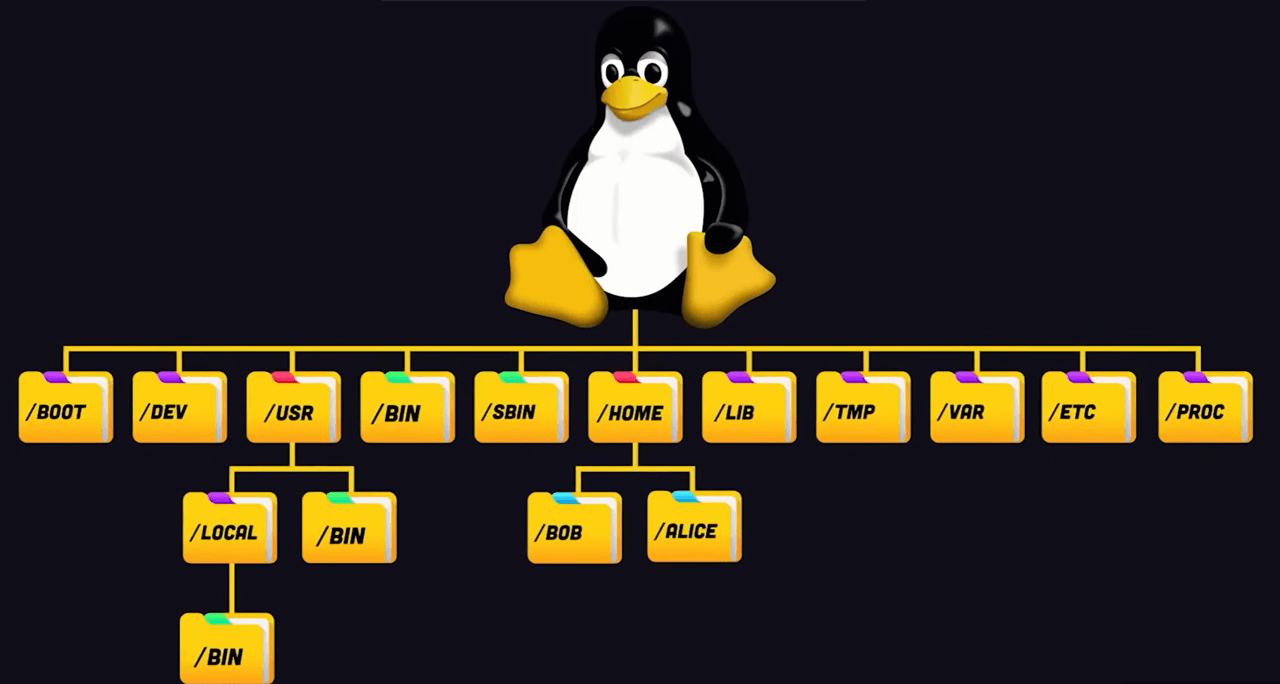
It always starts from the root, that is, the slash symbol. A process does not care how many disks we have. It sees only the tree. And accordingly, how does this work physically? Inside the kernel there is a layer called `VFS` — Virtual File System. This is exactly the same kind of universal interface. We take some SSD disk and tell the kernel: *“Mount it into the /boot folder.”* Then we take a network disk and say: *“Mount it into another directory, /mnt/share.”* We take RAM and mount it into `/run`. For a program, all of this looks the same. It simply writes files by paths, and VFS itself decides on the fly where to send these bytes. Through a SATA cable to an SSD, or through a network cable to another server. This is the transparency of abstraction. Now we go lower. What is a file physically? For us, it is simply some name, say photo.jpg, but for the kernel the name is an empty sound. Just a set of bytes for the convenience of the leather sack. For the kernel, a file is an inode, index node. Every file in the system is just a number. The inode stores all metadata except the name: who the owner is, what access rights there are, the file size, timestamps, and most importantly, pointers to disk sectors where the zeros and ones physically live. So what is the file name then? The name lives in the directory. And technically, a directory, that is, a folder, is also a file, but inside it lies a simple table of two columns: file name and inode number. And when, for example, we run the cat command and pass it a file name, the kernel at that moment reads the directory, finds the name, takes the corresponding inode number, then goes to the inode table, checks permissions and disk sectors, and only after that starts reading the data. Now let’s open up the concept “everything is a file” fully. Remember, we said that VFS is an abstraction? So Linux developers thought: “Why should we limit ourselves to disks? Let’s represent the kernel itself as files.” And so the /proc and /sys folders appeared. There are no files on disk there. The size of these files is 0 bytes. This is an illusion, but it is a direct interface for accessing kernel data structures in RAM. And, for example, when we read the file /proc/cpuinfo, the kernel does not go to the disk, it queries the processor and generates the text response on the fly. And the coolest thing is that this works both ways. We can write to these files. Want to enable packet routing, that is, become a router? We do not need to look for some checkbox in some control panel. We simply write the number 1 into the file /proc/sys/net/ipv4/ip_forward. The kernel intercepts this write and changes a variable in its code. That is what “everything is a file” means. It is a universal API for managing the system.
After the kernel is ready, it still needs to start the first user-space process. Historically that role belonged to `/sbin/init`; on modern systems it is usually `systemd`.
This first process becomes PID 1, and every other process on the machine descends from it in one way or another. If PID 1 fails, the system is effectively broken.
`systemd` is best understood as a dependency-aware startup manager. Instead of launching services one by one in a fixed sequence, it understands relationships between units and can start many of them in parallel while respecting what depends on what.
That is how the machine moves from "kernel is alive" to "SSH works, Docker starts, services come up, logs rotate, timers fire."
The file system is one tree with many backends
Linux does not present storage as a stack of drive letters. It presents one directory tree rooted at `/`.
Different devices, partitions, network shares, and even RAM-backed virtual file systems get mounted into that single tree. A process writes to paths; the kernel's virtual file system layer decides where those bytes really go.
Under the hood, files are not primarily names. The kernel tracks them as inodes: structures that store metadata, ownership, permissions, timestamps, and pointers to where the data actually lives. Directory names are just mappings from human-readable names to inode numbers.
This same idea extends beyond disks. Directories like `/proc` and `/sys` expose kernel state as if it were a file system. Reading from them often generates data on the fly; writing to them can change kernel behavior.
Processes communicate through file descriptors and pipes
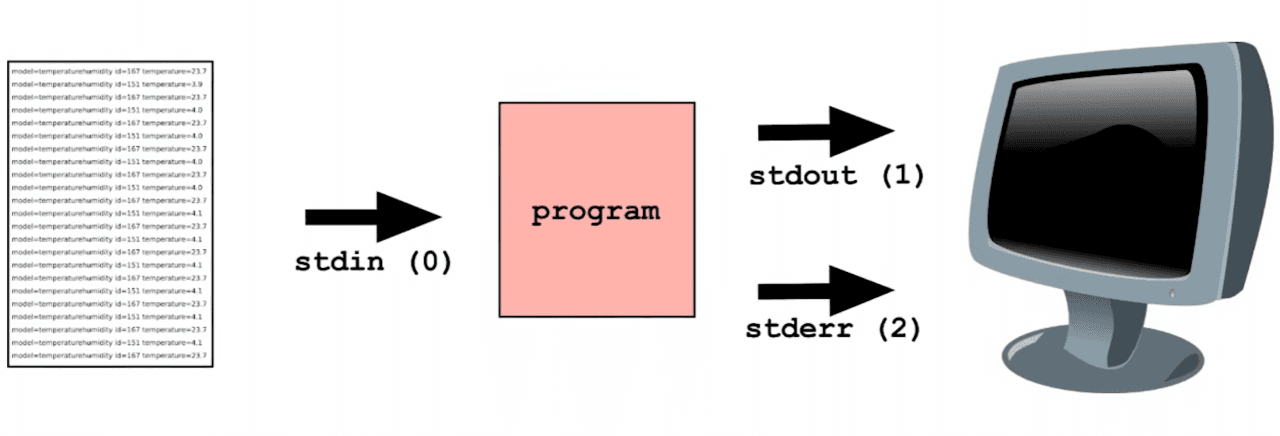
Every process starts with a few basic communication channels already opened by the kernel: standard input, standard output, and standard error.
Those channels are just file descriptors. By default they are usually connected to the terminal, but the kernel can redirect them anywhere: a file, a socket, or another process.
That is the idea behind pipes. In a command like `cat file.txt | grep ERROR`, the first process writes to a buffer, the second reads from it, and neither program needs to know who sits on the other side. The kernel rewires the streams so small programs can work together cleanly.
This is one of the most durable Unix ideas: make tools focused, then compose them through plain text streams.
Permissions are just rules the kernel checks every time
Linux security is not magical. At the basic level, it is a repeated comparison between a process identity and the permission bits attached to a file or directory.
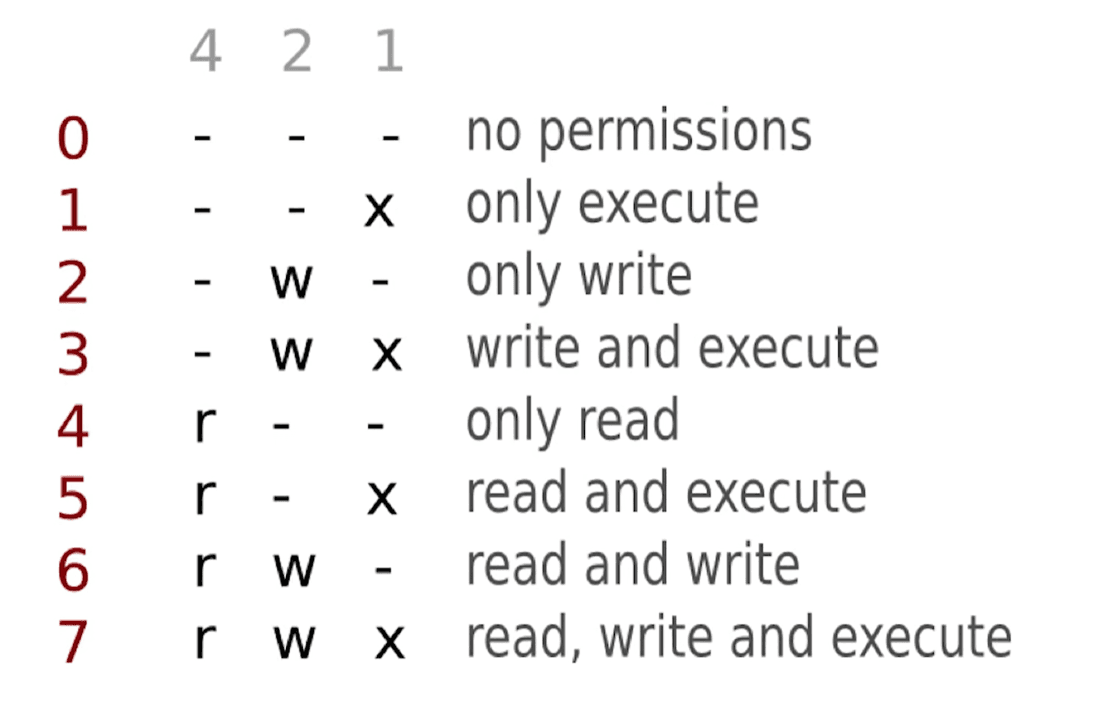
Users and groups are represented by numeric IDs such as UID and GID. Each inode records an owner, a group, and three permission sets: one for the owner, one for the group, and one for everyone else. Read, write, and execute are stored as bit flags, which is why values like `755` and `644` are so common.
`root` is special because UID 0 bypasses many ordinary permission checks. That power is useful, but it is also why good administration tries to avoid living permanently as `root` and prefers narrowly scoped `sudo`.
Package managers keep the top layer coherent
At the top of user space sits the software we actually install and run: shells, databases, web servers, libraries, and utilities.
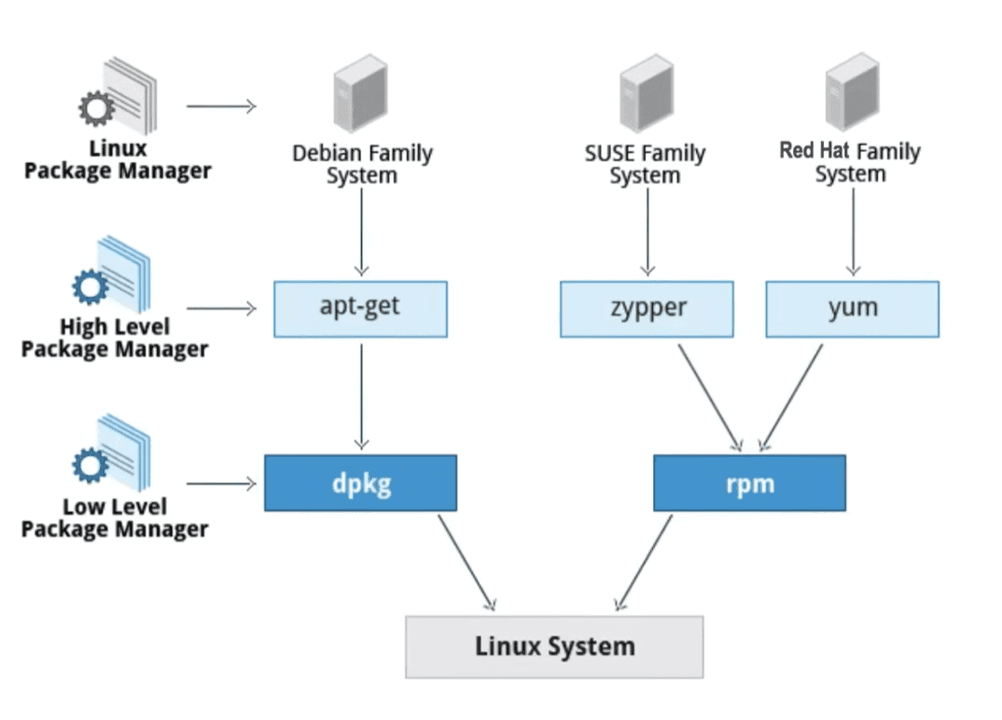
Linux distributions manage this through package repositories and tools such as APT, YUM, or APK. Instead of downloading random binaries one by one, you install packages from a curated ecosystem that knows where files belong and which dependencies they require.
That matters because Linux software is usually dynamically linked. Programs often share common libraries instead of bundling everything into each executable. This saves space and memory, but it also means versions have to remain compatible. Package managers exist to keep that shared world from collapsing into dependency hell.
The practical takeaway
If you keep this stack in your head, Linux becomes much easier to reason about.
At the bottom is hardware. Firmware wakes it up. The bootloader loads the kernel. The kernel manages memory, time, permissions, and hardware access. System calls are the boundary between protected kernel space and ordinary user space. PID 1 brings services to life. File systems, pipes, and packages give that user space structure.
The value of this model is practical. `Permission denied` is no longer an abstract complaint; it is the kernel rejecting a request after checking UID, GID, and inode bits. A slow server is no longer just "Linux being weird"; it may be scheduling pressure, I/O wait, or memory contention at a specific layer.
A command can be searched in seconds. Architectural understanding takes longer, but it pays back every time the system misbehaves.